Concepts
Portway follows a small set of ideas. Knowing them explains why the application behaves the way it does.
Agentless access
Section titled “Agentless access”Portway installs nothing on the server. It opens an SSH connection and runs commands that already exist there, such as sftp, systemctl, docker, nginx, ufw, firewall-cmd, openssl and curl. The server needs only OpenSSH and the tools of the feature in use. A feature whose tool is missing is reported as unavailable, and the other features keep working.
The consequence is that Portway has nothing to update on the server, leaves nothing behind when it is removed, and can manage a server that was never prepared for it.
Commands are visible
Section titled “Commands are visible”Before a change is made, Portway shows the exact command that will run, together with the server, the user and whether sudo is needed.
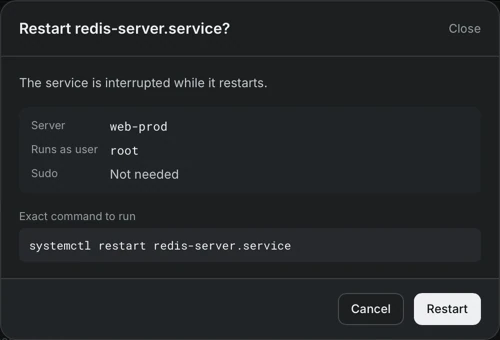
The same text can be copied into a terminal and produces the same result. Nothing happens in a form that cannot be reproduced by hand.
Every change is recorded
Section titled “Every change is recorded”Actions that Portway performs on the user’s behalf are written to an audit log with their result. A separate in-memory trace explains why a screen is slow. Commands that are typed in a terminal opened from Portway are not part of the audit log.
The real state of the server
Section titled “The real state of the server”Portway reads what the server actually uses, instead of what a configuration file claims. Nginx sites come from nginx -T, which prints the configuration that nginx has loaded. Listening sockets come from /proc/net. Certificates are read from what the site serves. Docker ports are compared with firewall rules, so that a port that Docker opened ahead of the firewall is shown as exposed.
Safety nets around risky changes
Section titled “Safety nets around risky changes”- Confirmation dialogs name the role of what is affected, for example a database that other containers depend on.
- Disabling an Nginx site is undone automatically when
nginx -tfails afterwards. - Turning on a firewall first adds a rule that allows SSH, then opens a new SSH connection to prove that access survives, and reverts when it does not.
- Stopping the SSH service, removing a volume or deleting the last firewall rule that allows SSH requires typing a name again.
Sessions and sudo
Section titled “Sessions and sudo”A session belongs to one server and one user. A server can have several accounts, and each account opens its own session. Elevated rights are a mode of a session, not a separate login: sudo is turned on explicitly, the password stays in memory for that session only, and only the actions that need it run through sudo.
Local first
Section titled “Local first”Portway has no account and no relay server. The server list, tunnel profiles and preferences are stored on the computer. Passwords and passphrases are stored in the Keychain on macOS and in Credential Manager on Windows. The details are described in Security and data.
Familiar conventions
Section titled “Familiar conventions”Portway reuses the conventions that SSH users already know: host keys are verified against ~/.ssh/known_hosts, hosts can be imported from ~/.ssh/config, jump hosts behave like ssh -J, and tunnels correspond to ssh -L, ssh -D and ssh -R. Many screens show the equivalent command.