Audit log and debug log
Portway keeps two separate records. They answer different questions.
| Audit log | Debug log | |
|---|---|---|
| Question | What did Portway change on this server? | What is Portway doing now, and why is a screen slow? |
| Where | The Actions via Portway section of the Overview | The Debug log window, opened from the bug icon of the icon rail |
| Content | Actions that Portway performed on the user’s behalf | Every remote command, SFTP call, connection step and transfer |
| Stored | In audit.jsonl, the newest 1,000 entries |
In memory only, the newest 2,000 entries |
Audit log
Section titled “Audit log”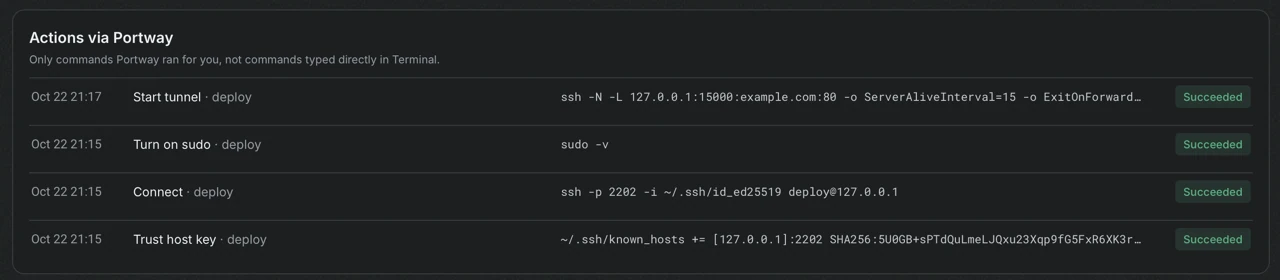
Each row shows the time, the action and the user, the command that was run and the result. The commands are the same ones that confirmation dialogs showed before the action. Entries include connecting and disconnecting, trusting a host key, turning sudo on and off, opening a terminal, following a log, uploads and other file operations, service and Docker actions, firewall and Nginx changes, and starting and stopping tunnels.
The section states its scope: only commands that Portway ran for the user are included. Commands that are typed in a terminal opened from Portway are not logged, and neither are the read-only commands that refresh a screen. Requests that are sent from the HTTP screen are kept in the request history instead.
Debug log
Section titled “Debug log”The debug log opens in its own window. It lists every command, SFTP call, connection step and transfer from the moment it starts, or from the moment it waits for a free SSH channel, until it ends.
| Column | Meaning |
|---|---|
| Time and Type | When the entry started and its kind: command, SFTP, connection or transfer |
| Task · command | What was done |
| Wait | The time spent waiting for a free SSH channel |
| Duration | The time that the operation itself took |
| Result | The outcome and the exit code |
Selecting an entry shows the beginning of its standard output and standard error. The filters narrow the list to running, failed or slow entries, and by session. Pause freezes the list, and Clear finished entries empties it. A badge on the bug icon shows how many tasks are running.
A long wait next to a short duration means that many operations competed for the limited number of SSH channels of a session. A long duration means that the command itself was slow.