HTTP requests
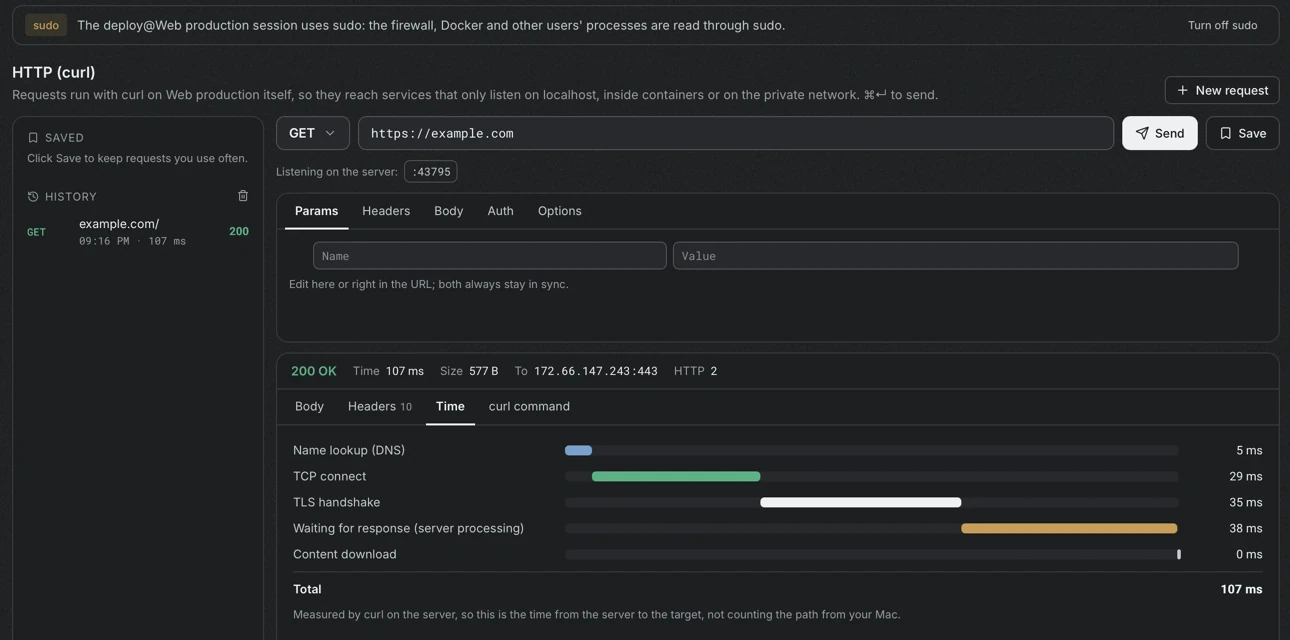
The HTTP (curl) section is a request builder in the style of Postman, with one difference: requests run with curl on the server. They reach services that listen only on localhost, services inside containers and services on the private network, and they answer as they would for the server itself.
curl must exist on the server. When it is missing, Portway shows the command that installs it: apt install curl on Debian and Ubuntu, dnf install curl on RHEL, or apk add curl on Alpine.
Build a request
Section titled “Build a request”- Choose the method and enter the URL. The URL must start with
http://orhttps://, and a URL without a scheme is read ashttp://. The row Listening on the server shows the ports that listen on the server, and selecting one fills the address. - Use the tabs to complete the request.
- Params: query parameters, which stay in sync with the URL.
- Headers: request headers.
Content-Typeis added from the type of the body unless it is set explicitly. - Body: none, JSON, form data (
application/x-www-form-urlencoded) or plain text. - Auth: a bearer token or basic authentication.
- Options: follow redirects, timeout, skipping certificate verification for self-signed certificates or calls by IP, accepting compressed content, and connecting to a given IP while keeping the domain in the URL (
curl --resolve), for example127.0.0.1to test an Nginx site on the server itself.
- Select Send, or press
⌘↵.
Read the response
Section titled “Read the response”The header of the response shows the status, the total time, the size, the address that was reached and the HTTP version. Four tabs follow.
| Tab | Content |
|---|---|
| Body | The body, with JSON formatted automatically. A body of more than 2 MB shows the first 2 MB, and binary content is not shown as text |
| Headers | The response headers |
| Time | The phases: name lookup (DNS), TCP connect, TLS handshake, waiting for the response (server processing) and content download |
| curl command | The command that runs identically in a terminal on the server |
The timing is measured by curl on the server, so it is the time from the server to the target, and it does not include the path from this computer.
Save requests
Section titled “Save requests”Save keeps a request, and the lists on the left show the saved requests and the history of this server. A saved request can be used for every server instead of only the current one. Tokens, passwords and secret headers are stored in the Keychain, and the rest is saved on this computer.
How secrets are passed
Section titled “How secrets are passed”Tokens, passwords and headers are given to curl through a temporary configuration file with mode 600, which is deleted immediately afterwards. They are not on the command line, so other users of the server cannot see them with ps. The curl command tab contains the secrets when the request uses them, so treat it with care.